Tag
keyboard shortcuts
-

Fixing Caps Lock on Chromebook: The Definitive Guide to Turning It Off
Every Chromebook user has experienced it: mid-sentence, fingers fly across the keyboard, only for the text to suddenly appear in all-caps—an unintended shout...
-

The Essential Guide to Capturing Screens on HP Laptops
Every professional, student, or casual user knows the moment arrives: you need to preserve what’s on your screen—whether it’s a critical error message, a...
-

how to screenshot on a hp notebook using keyboard shortcuts and advanced methods
HP’s lineup spans consumer laptops, business-grade EliteBooks, and Chromebooks, each with distinct screenshot capabilities. While keyboard shortcuts remain the...
-

Mastering how to take screenshot on Windows 11: Every Method Explained
The shift from Windows 10 to Windows 11 introduced subtle yet significant updates to screenshot functionality, including a redesigned Snipping Tool with...
-

The Hidden Power of How to Undo on Keyboard Every Pro Uses Daily
What separates the efficient from the overwhelmed isn’t just knowing how to undo on keyboard —it’s understanding the when and why . A single keystroke can...
-
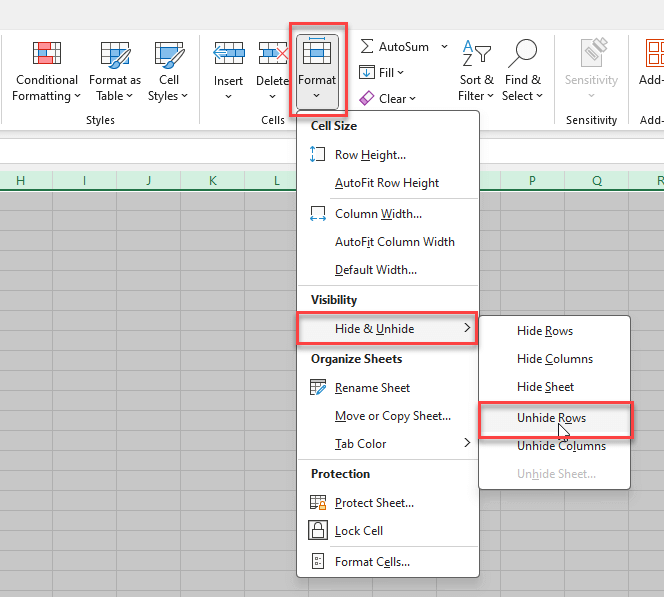
Excel’s Hidden Rows Revealed: The Definitive Guide to Unhide All Rows
The problem often arises from unintentional actions: a misplaced click, a macro execution, or even a formatting shortcut. Some users resort to brute-force...
-

How to copy and paste on keyboard with precision across devices
Platforms like Windows, macOS, and iOS have standardized shortcuts, but inconsistencies persist, particularly for devices with alternative input methods...
-

The Hidden Tricks to Insert a Degree Symbol in Any Format
Most users default to the same two methods: the numeric keypad’s `Alt+0176` combo or the character map lookup. These work, but they’re inefficient for heavy...
-

how to rotate computer screen in seconds with keyboard and display settings
The key to rotating a screen lies in recognizing whether your system relies on native OS shortcuts (like Windows 11’s built-in rotation) or third-party drivers...
-

The Hidden Efficiency Hack: How to Switch Tabs With Keyboard Like a Pro
The irony is that most users overlook this skill despite its ubiquity. Even those who know the basics often miss out on nuanced techniques—like cycling...
-

How to Add a Page in Google Docs: The Definitive Step-by-Step Process
The frustration often stems from a misunderstanding of how Google Docs handles pagination. Unlike traditional word processors, which treat pages as rigid...
-

how to change tabs with keyboard in every app and browser
The effectiveness of keyboard shortcuts depends on consistency and memorization. While some combinations are universal (like Ctrl+Tab), others vary by...
-

The Essential Guide to How to Copy Something Using the Keyboard
The act of duplicating digital content using only the keyboard is one of the most fundamental yet underappreciated skills in modern computing. Whether you're...
-

The Essential Guide to How to Copy with Keyboard Shortcuts
The act of duplicating digital content—whether text, images, or files—has undergone a silent revolution. What once required cumbersome mouse clicks now happens...
-

How to do em dash without missing punctuation precision
Mastery of the em dash begins with platform-specific techniques, but the foundational rule remains unchanged: it should appear without spaces before or after...
-

How to Take Screenshot on Windows 10: A Comprehensive Guide
Windows 10 offers a range of options for capturing screenshots, catering to both basic and advanced needs. From simple keyboard shortcuts to dedicated...
-

How to Turn FN Lock Off: The Definitive Guide to Freeing Your Keyboard Controls
For power users, developers, and anyone who relies on function keys for productivity, FN Lock is a double-edged sword. On one hand, it streamlines access to...
-

The Hidden Power of Typing an Em Dash—How to Type It Like a Pro
The problem lies in the gap between intention and execution. A quick Google search yields conflicting advice: "Press Shift+Alt+0151" for Windows...
-

The Definitive Guide to How to Type Subscript in Any Format
The problem deepens when you consider the fragmentation of tools at your disposal. Microsoft Word’s built-in subscript button may not behave the same way as...
-

How to Unmerge Cells in Excel: The Definitive Method for Data Clarity
Most users stumble upon this problem when importing legacy spreadsheets or collaborating with colleagues who prioritize aesthetics over functionality. The...